miercuri, 23 septembrie 2020

Close an open Microsoft Excel file from Microsoft Access

Let's say you need to delete or replace a certain Microsoft Excel file from a Microsoft Access application. 

Many times Microsoft Access need to report in Microsoft Excel files, so you need to generate them. But once a Microsoft Excel file was generated and even opened, you may loose control on that file. The user can modify it, and let it opened without saving it and after a while the user may need to see a fresh report in that file. So, Microsoft Access need to generate again that certain file, but is not that simple.

First, Microsoft Access need to see if that Excel file is opened.

Then Microsoft Access need to close it, without pending in a title bar blink and a message displayed, asking if you want to save any loaded files. Then it may need to delete it and generate it again with the new data.

All the manuals appeal to API functions. Below is how you may do it without them.


Sub ExcelGenerate()

Dim fso As Object

Dim strLoc As String


'choose the place where to generate the file:

strLoc = Application.CurrentProject.Path

Set fso = CreateObject("Scripting.FileSystemObject")


If fso.FileExists(strLoc & "/SomeXLFile.xlsx") Then

   'see ActivateXLFile below

   If ActivateXLFile("SomeXLFile.xlsx") = True Then

      MsgBox "The Excel File is open and cannot be closed!", vbInformation

   Else

       fso.DeleteFile strLoc & "/SomeXLFile.xlsx"

       'then generate a new Microsoft Excel file

       '.....

   End If

Else

    'if the file doesn't exists, then there is no problem to generate it...

End If

End Sub


Public Function ActivateXLFile(DenFile As String) As Boolean

Dim appExcel As Excel.Workbook


ActivateXLFile = False 'it's False by default anyway, but is good to mention


On Error Resume Next

'asume that the file is open and try to activate it

AppActivate DenFile, False


If Err = 0 Then

   'if the file is open and activate, err is zero

   On Error GoTo Exi

   Set appExcel = GetObject(Application.CurrentProject.Path & "/" & DenFile)

   'functional version: Set appExcel = CreateObject(Application.CurrentProject.Path & "/" & DenFile)

   With appExcel

       .Save 'save the file; you don't need any blinking message from Excel, you will replace it, anyway...

       .Close

   End With


Else

    'if the file isn't open, it cannot be activate and close. Clear the error.

    Err.Clear

End If


Exit Function

Exi:

'just to be sure: if there anything happen and the file cannot be closed...

ActivateXLFile = True

End Function


miercuri, 26 februarie 2020

ByVal, ByRef. The real use, beyond the lesson. VBScript

...but is also valid for all members of VB family.

Dim varA, strMsg 

varA = Int(InputBox ("Input the initial value:"))
strMsg ="'varA' initial: " & varA & Chr(13) & Chr(10)

varA = TransAVal(varA) 'varA ia valoarea functiei / varA it takes the function's value
strMsg = strMsg & "'varA' after TransAVal: " & varA & Chr(13) & Chr(10)

varA = TransARef(varA) 'varA ia valoarea functiei / varA it takes the function's value
strMsg = strMsg & "'varA' after TransARef: " & varA & Chr(13) & Chr(10)

ValA varA 'varA isi pastreaza valoarea / varA keeps its value
strMsg = strMsg & "'varA' after ValA: " & varA & Chr(13) & Chr(10)

RefA varA 'varA ia valoarea finala a parametrului din functia RefA / varA it takes the final value of the RefA function parameter
strMsg = strMsg & "'varA' after RefA: " & varA 
WScript.Echo strMsg

Function TransARef(ByRef x)
TransARef = x + 1
End Function

Function TransAVal(ByVal x) 
TransAVal = x + 1
End Function

Sub ValA(ByVal x)
x = x + 1
End Sub

Sub RefA(ByRef x)
x = x + 1
End Sub

Conclusion:
ByRef and BvVal have no influence if you return the function to assign it to a value. This is the most common situation.

Extracting from a string. VBA

Something easy for today:
If you have a text string with numbers within (let say you are interested only in those numbers, it's just an example), and you want to pick up those numbers from the text, you need a function to do it.


Option Explicit

'source code: https://code-for-vb.blogspot.com/2020/02/extracting-from-string-vba.html
'please to mention


Function NumbersFromText() As String
Dim i As Integer
Const a = "ancduirg123456ggt789uyq"
Dim b As String
Dim c As String
Dim d As String
Dim e As String

b = a
c = a

'split constant a in characters and find the ASCII code for each:
For i = 1 To Len(a)
    'just for a better understanding:
    Debug.Print Mid(a, i, 1), Asc(Mid(a, i, 1))
    'the Debug window will contain this text:
'    a              97
'    n              110
'    c              99
'    d              100
'    u              117
'    i              105
'    r              114
'    g              103
'    1              49
'    2              50
'    3              51
'    4              52
'    5              53
'    6              54
'    g              103
'    t              116
'    7              55
'    8              56
'    9              57
'    u              117
'    y              121
'    q              113

    'replace every non-digit character with zero / with zero length string:
    If Asc(Mid(a, i, 1)) < 49 Or Asc(Mid(a, i, 1)) > 57 Then
       b = Replace(b, Mid(a, i, 1), "")
       c = Replace(c, Mid(a, i, 1), 0)
    End If
Next i
'now, b is 123456789
c = Trim(Str(Val(c)))
'now, c is 123456000789000

'reverse the string c in d
For i = Len(c) To 1 Step -1
    d = d & Mid(c, i, 1)
Next i
d = Trim(Str(Val(d)))
'now, d is 987000654321

'reverse the string d in e
For i = Len(d) To 1 Step -1
    e = e & Mid(d, i, 1)
Next i

'c could be reused for saving memory:
c = Replace(e, "0", "_")
Debug.Print "Substract only numbers from string '" & a & "' : " & b
Debug.Print "Keep only the numbers interval from string '" & a & "' : " & e & " or " & c

'this is what Immediate window will show:
'Substract only numbers from string 'ancduirg123456ggt789uyq' : 123456789
'Keep only the numbers interval from string 'ancduirg123456ggt789uyq' : 123456000789 or 123456___789

'remain to choose:
NumbersFromText = b
'or
NumbersFromText = c
'or
NumbersFromText = e
End Function


Note that you need to call this function from abroad, so constant "a" should be passed as parameter of the NumbersFromText Function, like this:

Function NumbersFromText(a As String) As String
...
...
...
End Function

luni, 10 februarie 2020

DoCmd.GoToRecord doesn't work on subforms

Presupun că orice programator VBA Access a simțit la un moment dat nevoia unei comenzi de genul DoCmd.GoToRecord , , acNext care să acționeze într-un subformular. Dar, nu merge. O comandă de acest tip va genera o eroare ca cea de mai jos:

I suppose that any VBA Access programmer at one point felt the need for a command like DoCmd.GoToRecord , , acNext, to work in a subform. But it is not working. An order of this type will generate an error like the one below:


Această eroare apare indiferent de felul în care este apelat subformularul, așa
This error occurs regardless of how the subform is called, this way

DoCmd.GoToRecord acDataForm, "Table2 subform", acNext

sau așa
or that way

DoCmd.GoToRecord acDataForm, Forms!Form1![Table2 subform].Form.Name, acNext


Astfel, trebuie găsită o altă cale.
Să presupunem că avem un formular care conține două subformulare și avem nevoie să scriem într-un subformular și în acealși timp să vedem rezultatul în al doilea subformular. Voi pune mai jos codul și felul în care trebuie construite formularele.

Thus, another way must be found.
Suppose we have a form that contains two subforms and we need to write in a subform and at the same time see the result in the second subform. I will put below the code and the way in which the forms must be build.

Mai întâi, voi construi două tabele Table1 și Table2 astfel:
First, I will build two tables Table1 and Table2 as follows:


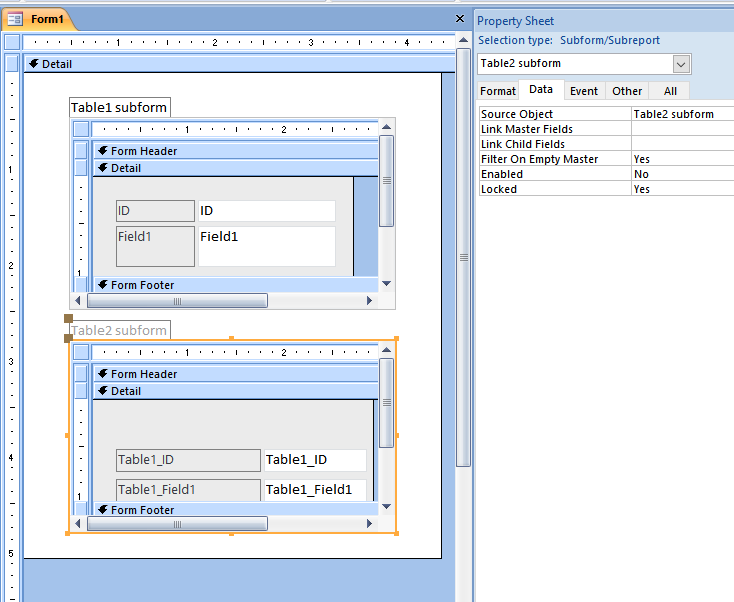
Apoi, voi construi un formular Form1 și două subformulare corespondente celor două tabele, Table1 subform și Table2 subform. Acestea vor putea arăta astfel:

Then I will build a Form1 form and two subforms corresponding to the two tables, Table1 subform and Table2 subform. They will look like this:


Sursele datelor pentru Tabel1 subform și Tabel2 subform sunt
SELECT [Table1].[ID], [Table1].[Field1] FROM Table1
respectiv 
SELECT Table2.Table1_ID, Table2.Table1_Field1 FROM Table2

Data sources for Table1 subform and Table2 subform are
SELECT [Table1]. [ID], [Table1]. [Field1] FROM Table1;
respectively
SELECT Table2.Table1_ID, Table2.Table1_Field1 FROM Table2;


Ca să fie evitate orice erori de introducere, Table2 subform nu trebuie să permită scrierea. Puteți seta proprietățile controlului care conține subformularul Enabled = No sau Locked = Yes.

In order to avoid any input errors, Table2 should not allow writing. You can set Enabled = No or Locked = Yes for the control properties that contain the subform.


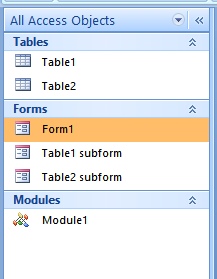
Acum, obiectele bazei de date vor arăta astfel:
Now, the database objects will look like this:


În Module1 voi scrie codul pentru resetarea tabelelor după fiecare încercare:
In Module1 I will write the code to reset the tables after each attempt:

Option Compare Database
Option Explicit

Sub BackCounter()
With CurrentDb
     .Execute "DELETE FROM Table1"
     .Execute "DELETE FROM Table2"

     .Execute "ALTER TABLE Table1 ALTER COLUMN ID COUNTER (1,1)"
End With
End Sub


În modulul subformularului Table1 subform voi scrie următorul cod, pentru evenimentele Form_AfterInsert, Form_Current și Form_Delete:
In Table1 subform VBA module I will write the following code for Form_AfterInsert, Form_Current and Form_Delete events:

Option Compare Database
Option Explicit

Private Sub Form_AfterInsert()
With Forms!Form1![Table2 subform].Form
     .Recordset.AddNew
     !Table1_ID = Me!ID
     !Table1_Field1 = Me!Field1
     .Refresh
End With
End Sub

Private Sub Form_Current()
'there is an error with OnOpen event, because Table2_subform is not initialized yet
On Error GoTo ErrEx
With Forms!Form1![Table2 subform].Form.Recordset
     .MoveFirst
     .Move Me.Recordset.AbsolutePosition
End With

ErrEx:
End Sub

Private Sub Form_Delete(Cancel As Integer)
Forms!Form1![Table2 subform].Form.Recordset.Delete
'after Delete, Table2 was going to the first record
'so, to make sure the both tables are on the same record, put the Table1 on the first record:
Me.Recordset.MoveFirst
End Sub


Rezultatul arată astfel:
The result looks like this:


Când se va introduce rând nou în Tabel1 subform, se va adăuga și în Tabel2 subform. Dacă se va șterge un rând din Tabel1 subform, în Tabel2 subform va fi șters rândul corespunzător.

When a new row is inserted into Table1 subform, it will be added to Table2 subform as well. Deleting a row from Table1 subform will delete the corresponding row in Table2 subform.


miercuri, 11 decembrie 2019

DAO Recordset AddNew vs. SQL INSERT INTO - which is faster?


Dincolo de orice opinie, am pus mai jos codul care are raspunsul adevarat la intrebarea din titlu.
Am ales trei situatii, am facut trei tabele (Table1, Table2, Table3), fiecare cu doua campuri (ID - AutoNumber, fieldTXT - ShortText) si am rulat un singur cod pentru a insera 100000 de inregistrari in fiecare tabel.


Beyond any opinion, I have put below the code that has the true answer to the title question.
I chose three situations, made three tables (Table1, Table2, Table3), each with two fields (ID - AutoNumber, fieldTXT - ShortText) and ran a single code to insert 100,000 records in each table.


Sub Faster()
Dim valTime1 As Long, valTime2 As Long
Dim rst As Recordset
Dim i As Long

'reset tables, just for sure, for when this code is repeated:
With CurrentDb
     .Execute "ALTER TABLE Table1 ALTER COLUMN ID COUNTER (1,1)"
     .Execute "ALTER TABLE Table2 ALTER COLUMN ID COUNTER (1,1)"
     .Execute "ALTER TABLE Table3 ALTER COLUMN ID COUNTER (1,1)"
End With

valTime1 = Time * 86400
Set rst = CurrentDb.OpenRecordset("Table1")
For i = 1 To 100000
    rst.AddNew
    rst!fieldTXT = "123456789101112131415161718192021222324252627282930"
    rst.Update
Next i
rst.Close
Set rst = Nothing
valTime2 = Time * 86400
Debug.Print "DAO Recordset: ", valTime2 - valTime1

valTime1 = Time * 86400
For i = 1 To 100000
    CurrentDb.Execute "INSERT INTO Table2 (fieldTXT) VALUES ('123456789101112131415161718192021222324252627282930')"
Next i
valTime2 = Time * 86400
Debug.Print "SQL INSERT single row: ", valTime2 - valTime1

valTime1 = Time * 86400
CurrentDb.Execute "INSERT INTO Table3 (fieldTXT) SELECT fieldTXT FROM Table1"
valTime2 = Time * 86400
Debug.Print "SQL INSERT multiple rows: ", valTime2 - valTime1
End Sub


rezultatul apare in Immediate Window (in secunde):
the result appears in the Immediate Window (in seconds):


DAO Recordset:               12 
SQL INSERT single row:       61 
SQL INSERT multiple rows:    0 

Wow!

joi, 28 noiembrie 2019

The folder contents - VB Script

Dacă aveți nevoie să scoateți rapid un raport în care să existe conținutul unui folder, puteți folosi VB Script. Următorul cod va genera un fișier .csv. Se poate folosi Microsoft Excel pentru deschidere.
Pentru departajarea coloanelor, datorită setărilor locale se va putea folosi alternativ "," sau ";".


If you need to quickly extract a report with a certain folder contents, you may use VB Script. The following code will generate a .csv file. You may use Microsoft Excel to open it.
For the separation of the columns, due to the local settings it will be possible to use alternatively "," or ";".


'source: https://code-for-vb.blogspot.com/2019/11/the-folder-contents-vb-script.html
'please to mention

Dim Fol  
Dim sFol
Dim Fil   
Dim strPath  
Dim fso   

Dim objShell
Dim MyFile
Dim CurrentDirectory 

Const ForReading = 1, ForWriting = 2, ForAppending = 8
Const TristateUseDefault = -2, TristateTrue = -1, TristateFalse = 0


Set fso = CreateObject("Scripting.FileSystemObject")
CurrentDirectory = fso.GetAbsolutePathName(".")

Set objShell=CreateObject("WScript.Shell")

strPath = InputBox("Input the folder address:")

On Error Resume Next
Set Fol = fso.GetFolder(strPath)
If Err.Number <> 0 Then 
   Eroare()
   WScript.Quit
End if
On Error GoTo 0

If fso.FileExists(CurrentDirectory & "\txtStructList.csv") Then fso.DeleteFile(CurrentDirectory & "\txtStructList.csv")

Set MyFile = fso.OpenTextFile(CurrentDirectory & "\txtStructList.csv", ForAppending, True, TristateUseDefault) 
MyFile.WriteLine "Name , Type , Date created , Date modified , Date accessed , Files number , Subfolders number , Size" 

For Each sFol In Fol.SubFolders
    MyFile.WriteLine sFol.Name & " , folder , " & sFol.DateCreated & " , " & sFol.DateLastModified & " , " & sFol.DateLastAccessed & " , " & sFol.Files.Count & " , " & sFol.SubFolders.Count & " , " & sFol.Size & " bytes"
Next

For Each Fil In Fol.Files
    MyFile.WriteLine Fil.Name & " , fisier , " & Fil.DateCreated & " , " & Fil.DateLastModified & " , " & Fil.DateLastAccessed & " , , , " & Fil.Size & " bytes"
Next

MyFile.Close
objShell.Run CurrentDirectory & "\txtStructList.csv"


Sub Eroare()
    MsgBox Err.Description, vbExclamation, "ERR: " & Err.Number
End Sub

duminică, 17 noiembrie 2019

How Much Time Has Passed - VBA

Uneori avem nevoie sa stim cat timp a trecut intre doua date, in termeni de zile, luni si ani. Simpla scadere a datei mai mici din data mai mare nu este suficienta: numarul rezultat este doar numarul zilelor. Din nefericire, felul in care ne-am structurat timpul in zile, luni si ani nu face usor calculul in acesti termeni: luna poate avea 28, 29, 30 sau 31 de zile; intre 28 februarie si 31 martie avem o luna si 3 zile, iar odata la patru ani avem o luna si 2 zile.

Functia de mai jos simplifica lucrurile. Ea poate fi folosita ca atare. In Excel, va aparea in lista de functii si se vor putea face referinte catre celule. Variabilele declarate la nivel de modul pot fi folosite separat in alte functii sau rutine.

--------------------------------------------------------------------------------------
Sometimes we need to know how much time has elapsed between two dates, in terms of days, months and years. Simply subtracting the smaller date from the larger date is not enough: the resulting number is just the number of days. Unfortunately, the way we have structured our time in days, months and years does not make the calculation easy in these terms: the month can be 28, 29, 30 or 31 days; between February 28 and March 31 we have a month and 3 days, and every four years we have a month and 2 days.

The function below simplifies things. It may be used as such. In Excel, it will appear in the list of functions and will be able to make references to cells. The variables declared at the module level can be used separately in other functions or routines.


'source:  https://code-for-vb.blogspot.com/2019/11/how-much-time-has-passed.html
'please to mention

Option Explicit

Public y As Integer, m As Byte, d As Byte


Public Function TimeSTR(ByRef DataStart As Date, ByRef DataEnd As Date) As String
Dim yearStart As Integer, yearEnd As Integer
Dim monthStart As Byte, monthEnd As Byte
Dim dayStart As Byte, dayEnd As Byte

Dim dayMonthFinal As Byte
Dim inReverse As Boolean, TemporarData As Date


If DataStart = 0 Or DataEnd = 0 Then
   TimeSTR = "no begining / ending date"
   Exit Function
End If

10
Select Case DataEnd >= DataStart
Case True
     yearStart = Year(DataStart)
     yearEnd = Year(DataEnd)

     monthStart = Month(DataStart)
     monthEnd = Month(DataEnd)

     dayStart = Day(DataStart)
     dayEnd = Day(DataEnd)

Case False
     inReverse = True
     
     TemporarData = DataStart
     DataStart = DataEnd
     DataEnd = TemporarData
     
     GoTo 10
End Select

'finding leap years and odd or even months
Select Case monthEnd
Case 1, 3, 5, 7, 8, 10, 12 '31 days
     dayMonthFinal = 31
        
Case 2 'February - see leap years
     Select Case yearEnd Mod 4
     Case 0
          dayMonthFinal = 29
                     
     Case Else
          dayMonthFinal = 28
     End Select
        
Case 4, 6, 9, 11 '30 days
     dayMonthFinal = 30
End Select


'y=years
'm=months
'd=days
Select Case yearStart = yearEnd
Case True 'year
     Select Case monthStart = monthEnd
     Case True 'month
          y = 0
          m = 0
          d = dayEnd - dayStart
          
     Case False 'month
          Select Case dayEnd >= dayStart
          Case True 'day
               y = 0
               m = monthEnd - monthStart
               d = dayEnd - dayStart
               
          Case False 'day
               y = 0
               m = monthEnd - monthStart - 1
               d = dayEnd + dayMonthFinal - dayStart
          End Select 'day
     End Select 'month
     
Case False 'year
     Select Case monthEnd >= monthStart
     Case True 'month
          Select Case dayEnd >= dayStart
          Case True 'day
               y = yearEnd - yearStart
               m = monthEnd - monthStart
               d = dayEnd - dayStart
               
          Case False 'day
               Select Case monthStart = monthEnd
               Case True 'month
                    y = yearEnd - yearStart - 1
                    m = 11 '(12-1)
                    d = dayEnd + dayMonthFinal - dayStart + 1
                    
               Case False 'month
                    y = yearEnd - yearStart
                    m = monthEnd - monthStart - 1
                    d = dayEnd + dayMonthFinal - dayStart
               End Select 'month
          End Select 'day
     
     Case False 'month
          Select Case dayEnd >= dayStart
          Case True 'day
               y = yearEnd - yearStart - 1
               m = 12 - monthStart + monthEnd
               d = dayEnd - dayStart
               
          Case False 'day
               y = yearEnd - yearStart - 1
               m = 12 - monthStart + monthEnd - 1
               d = dayEnd + dayMonthFinal - dayStart
          End Select 'day
     End Select 'month
End Select 'year

TimeSTR = y & " years, " & m & " months, " & d & " days" & IIf(inReverse, " in reverse", "")
End Function